The End of ClickOps
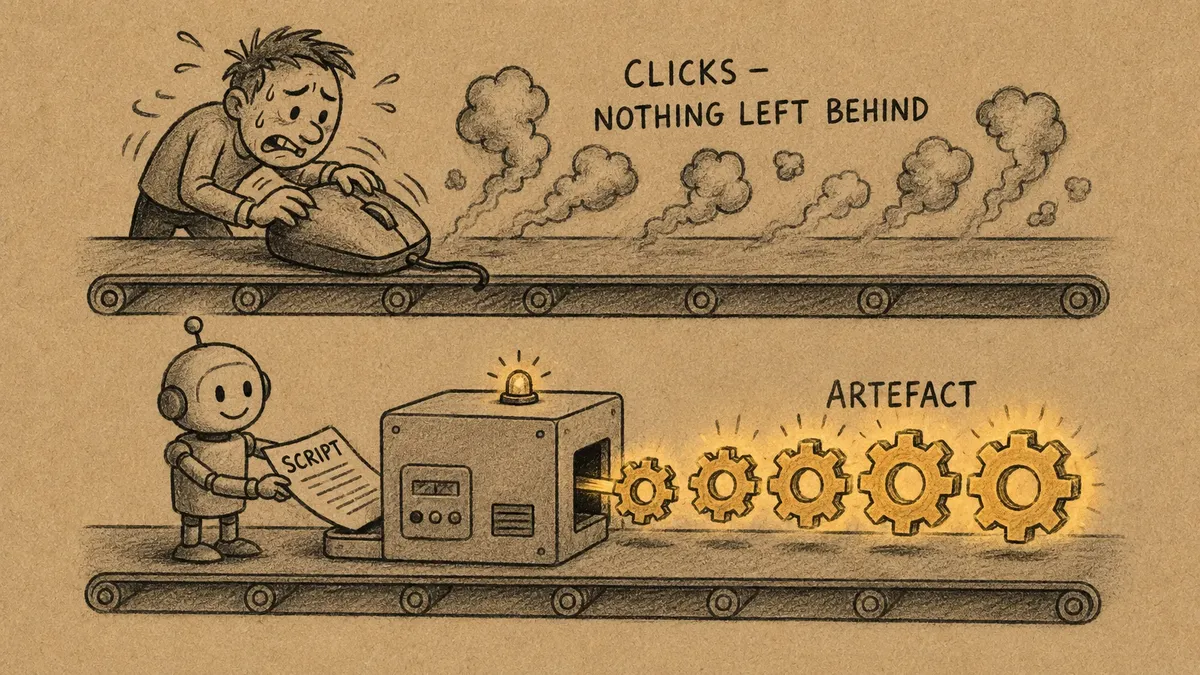
At Ignite last November, I went to a few Azure Infrastructure sessions and kept hearing the attendees and presenters say a word with a slight sneer. ClickOps. I had not come across it. It means configuring systems by hand, clicking through a console or a portal, screen after screen, setting each thing manually because that is how the tool wants you to work. The infra crowd say it the way you might say “still faxing”. The more I listened, the more uncomfortable I got, because they were describing how many people promote building low-code / no-code solutions and configurability as the holy grail.
We have had the exits all along
Dynamics has had an API for everything since version 4.0. Every table, every form, every list view, every security role can be created and changed in code. That has been true for the best part of fifteen years.
And yet the default way to build, still, is to open make.powerapps.com and to start clicking. Drag a field. Click save. Click publish. Click into the next screen. Click save. The UI is newer than Dynamics 4.0 but it’s ClickOps, in a nicer jumper.
The more I use AI, the more convinced I am: frictionless means eliminating clicks.
Hunt-and-pecking
Hunt-and-peck is a slow typing method where typists use visual searching to find the keys. Before touch typing, everyone hunted and pecked: one finger, eyes down on the keyboard, searching for each key. Touch typing worked out that if you learned the home row and trusted your muscle memory, you could type without looking at the keyboard at all. It transformed office productivity.
ClickOps is hunt-and-peck for building software. Eyes down (up?) on the maker portal, hunting for the right setting, one click at a time.
Configuration as code is touch typing. It feels awkward for about a week, you have to learn where the home row is, and then you stop looking at the keyboard entirely. You stop hunting through screens, and the work comes out of your hands and into the hands of an agent.
A project with no maker portal
I recently ran a Power Platform project from start to finish without opening the maker portal to build any of it. Everything went through the APIs. Directing agents between meetings. The tables and the forms, the formxml and the viewxml, the apps, the security roles. Everything you found in the Dataverse solution. And then we did the same with artefacts in DevOps.
None of it was clicked into existence. It was built by a set of small, deterministic tools, mostly well organised Python programs that call the platform’s APIs and do the same thing the same way every time, orchestrated by an AI agent, with an appropriate human in the loop at the points that genuinely needed a human decision.
Deterministic vs Non-Deterministic
The agent is non-deterministic: ask it the same thing twice and you can get two different answers. That is wonderful for judgement but useless for generating a valid form definition. Ask an AI to hand-write the raw formxml for a Dataverse entity and it might do it differently every time. Now and again it will produce something subtly malformed that the platform rejects with a shrug.
A better pattern is to build a set of deterministic tools that produce a correct templated formxml every time. Then you can let the non-deterministic agent use your harness to decide when to reach for it. Non-deterministic patterns are where you want judgement and deterministic tools are where you want it done right.
If you are creating Dataverse tools, make sure your harness instructs the agent to build them as idempotent. Idempotent is an ugly word for a lovely property: you can run the script a hundred times and the result is the same as running it once. It does not blindly repeat the steps, it makes the environment match the spec. That is the line between a record of something you once did and something you keep using.
”Sure, it only takes a few days”
Whenever I describe this I sometimes hear “But creating a few entities only takes a few days”. That is the trap.
ClickOps is individually cheap and collectively ruinous. Every click is a tiny act of manual data entry: untracked, unrepeatable, and error-prone. Do it once and it is a few days. Do it again on the next environment, and the next change, and the next project, all by hand, and you have lovingly rebuilt the one thing we spent decades automating out of everyone else’s job - data entry.
The real cost is what the few days leave behind: nothing. A pile of clicks is not reusable, not reviewable, and not grounded. A script is all three. When configuration becomes code, it can be versioned, repeated, reviewed, and handed to the next agent as context. The clicks vanish and what is left is an artefact.
Configuration 1.0 is dead
The infrastructure crowd at Ignite were right to sneer. In Dynamics 365 and Dataverse we have had an API for everything for fifteen years and a whole generation of habits built around pretending we did not. The portal felt like the product. It was only ever the data-entry screen. Application Development as Code (AdaC) is the new Infrastructure as Code (IaC) - that’s a long-term way to reduce friction.
Frictionless was never about clicking faster. It was about not clicking at all.
Did you find this post helpful?
A little support goes a long way in helping me create more free, in-depth content like this.